Write ISO and DD disk images to USB drives on Windows.
Flint is a lightweight Windows-native utility for writing ISO and DD images to USB drives. It verifies every write with SHA-256 read-back, and wipes drives to NIST and DoD standards. Portable, no installation needed.
What's new in the latest release →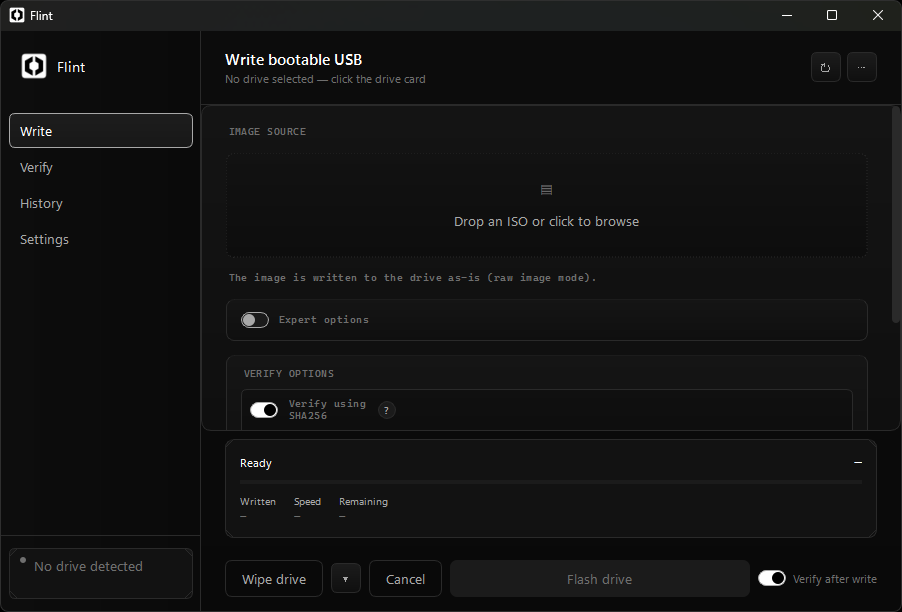
v1.9.0 · windows 10/11 64-bit · SHA-256 verified build
Up and running in three steps
Pick your image
Drag and drop an ISO or DD file, or browse for it. Flint computes its SHA-256 hash for later comparison.
Pick your drive
Choose from detected USB drives — model, size and serial are shown. Type the confirmation to arm the write.
Flash and verify
Flint writes the image, then re-reads the drive and compares hashes. A flash report is saved to history.
Everything you need to image drives
Flint covers the full workflow: flash, verify, wipe, backup, clone — with headless CLI support for IT imaging at scale.
Drag & drop flashing
Drop an ISO or DD image straight into the window. Flint computes its SHA-256 hash up front and uses it to verify the drive afterwards.
Verified drive wipes
Zero fill, single random pass (NIST 800-88) or DoD 5220.22-M three passes. Every wipe ends with a read-back pass confirming the final pattern.
Post-write verification
Flint re-reads the drive after flashing and compares SHA-256 hashes, reporting exact mismatch offsets if anything differs.
Bad-block scan
A post-flash scan retries unreadable sectors and reports their exact locations instead of failing silently.
Persistence & Windows To Go
Create Linux live USB drives with persistent storage, or Windows To Go drives for running Windows from USB.
Backup & clone
Back a drive up to an image file, or clone one drive onto another — handy before re-imaging a fleet.
Flashing erases drives. Flint is built around that.
Safety by design
Flint writes raw images directly to the physical disk, so mistakes are permanent:
- Typed confirmation required before any destructive action — no accidental double-clicks.
- Every write is verified by reading the drive back after flashing.
- Every wipe is verified with a read-back pass confirming the final pattern.
- Drive detection shows model, size and serial so you know exactly what you're writing to.
- Flash history keeps a record of every operation you've performed.
One file. No install.
Grab the latest flint.exe from GitHub Releases — a single portable
executable for Windows 10/11 64-bit. No installer, no dependencies, no telemetry.